
AI Product / Professional Communication
Professional Language Toolkit
Better communication starts with clearer thinking.
Made at Southern Haze — An original studio product.
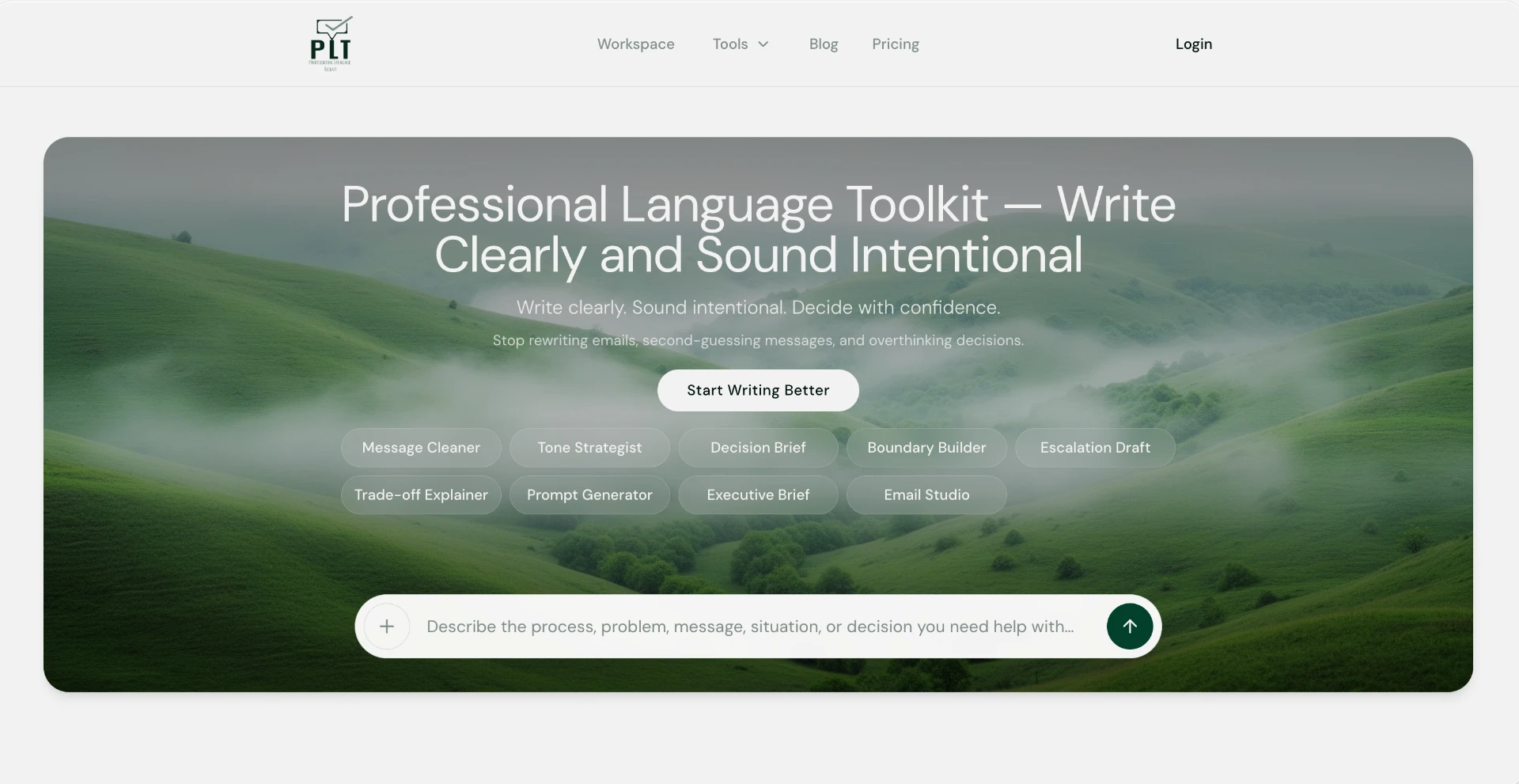
Professional Language Toolkit brings practical writing, decision-support, and prompt-building tools into one focused experience.
- Product Strategy
- AI Integration
- UX Design
- Workflow Design
- Information Architecture
01 / Overview
From an unfinished thought to a structured starting point.
Whether you're refining an important email, navigating a sensitive conversation, explaining a complex decision, or preparing instructions for an AI assistant, PLT helps you move from an unfinished thought to a more structured starting point.
PLT is designed to make communication and AI-assisted work more practical—not more complicated.
02 / The challenge
The hard part is rarely the typing.
Most people don't need an empty AI chat box. They need help with a specific moment: an email that has to land well, a boundary that has to be set without damaging a relationship, a decision that has to be explained to people who weren't in the room.
General-purpose AI tools can help, but only if you already know what to ask and how much context to give. That puts the burden back on the person who came for help — and the result often sounds generic, misses the audience or needs several rounds of correction.
03 / The approach
Start from the task, not the technology.
Instead of asking users to learn prompting, each PLT tool is built around one recognisable professional task. The tool asks for the context that task actually needs — who the audience is, what outcome matters, what tone fits — and shapes the response around it.
That structure is the product: focused inputs make the thinking clearer before anything is written, and structured outputs give users something they can review, adjust and use. The user stays in control of the final words.
04 / The experience
Nine focused tools, one toolkit.
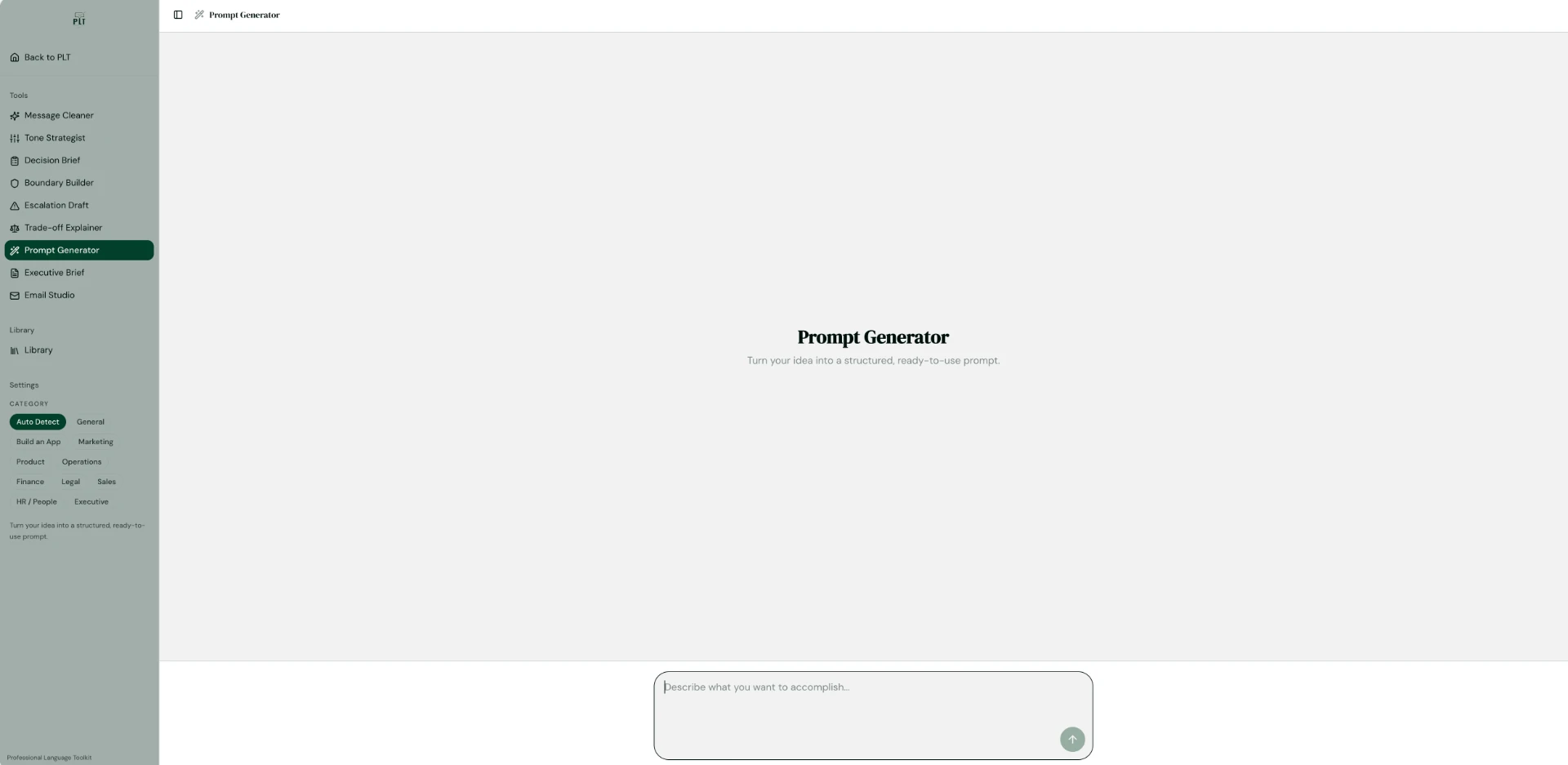
A shared sidebar keeps every tool one click away, with a Library for saved work and categories that tailor the output to the situation.
- 01Message Cleaner — clearer professional emails and messages
- 02Tone Strategist — adjust tone for different audiences
- 03Boundary Builder — communicate boundaries respectfully
- 04Decision Brief — turn thinking into a decision brief
- 05Trade-off Explainer — explain decisions and tradeoffs
- 06Escalation Draft — prepare escalation messages
- 07Executive Brief — summarize and structure executive communications
- 08Email Studio — draft and refine longer email
- 09Prompt Generator — build more effective prompts for AI tools
05 / Prompt Generator
From a rough idea to a better prompt.
The Prompt Generator helps users develop clearer, more structured instructions for AI tools without needing to understand prompt engineering. By helping users clarify their goals, supply relevant context, and define useful outputs, it makes AI tools more approachable for everyday business tasks.
It extends the toolkit’s approach beyond professional writing: the same habit of clarifying the audience, the goal and the expected result, applied to working with AI.
- 011. Start with a goal, rough idea or task.
- 022. The Prompt Generator helps structure the request.
- 033. The resulting prompt provides clearer context, instructions, constraints and output expectations.
- 044. Apply that prompt in a relevant AI tool and refine it as needed.
06 / Prompt Generator demonstration
From idea to instruction.
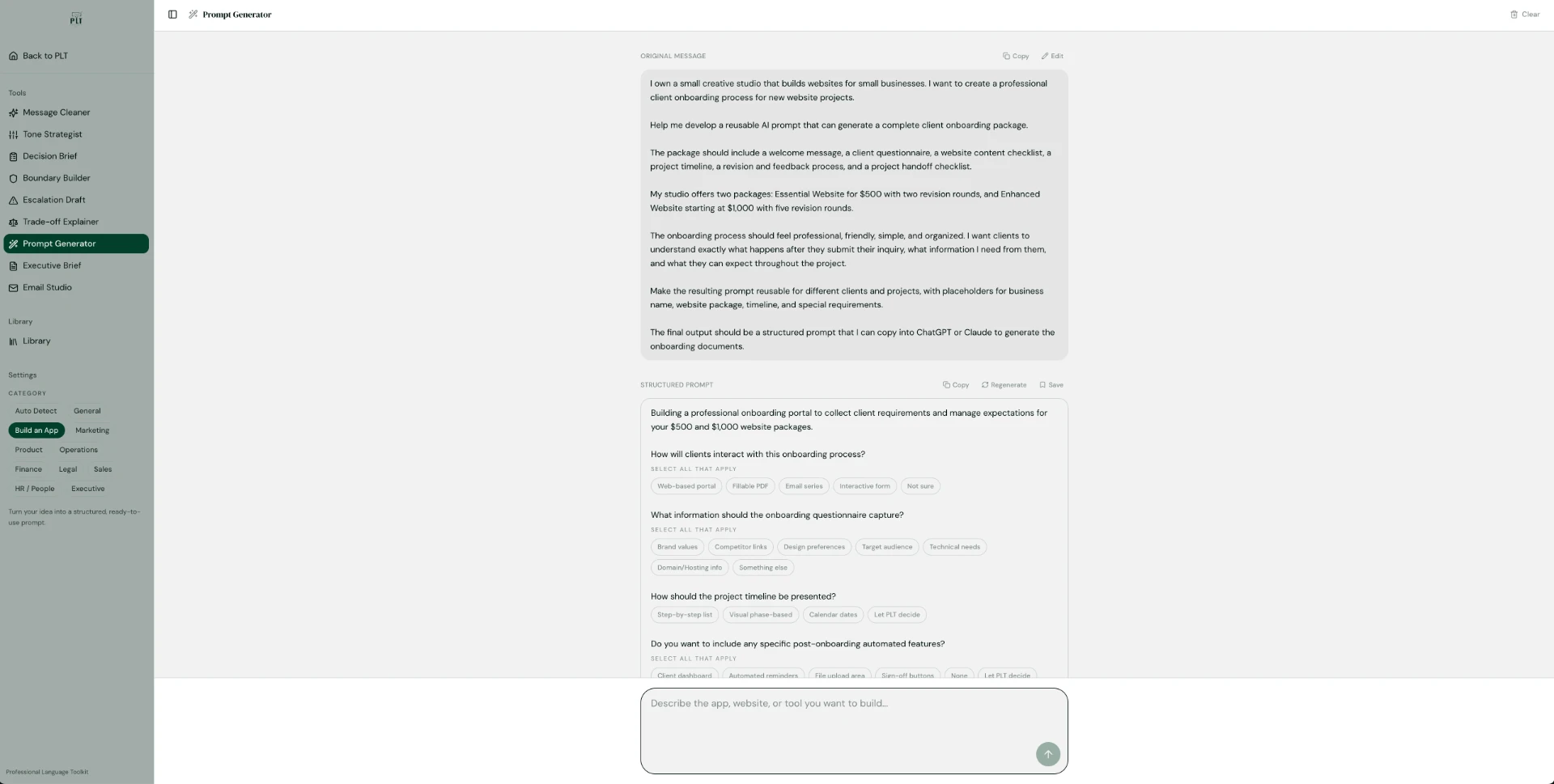
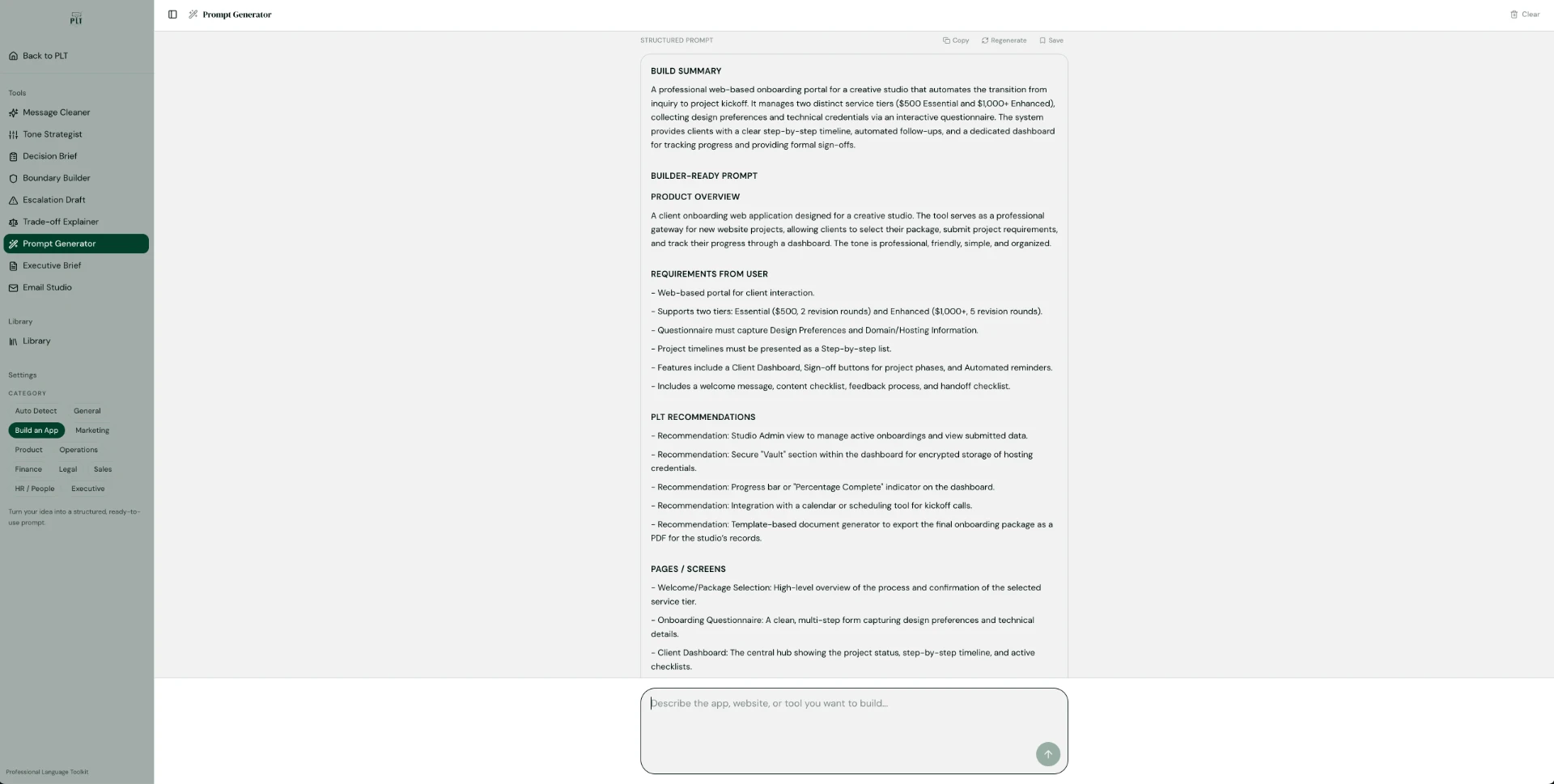
A real Prompt Generator session: a small creative studio asks for a reusable AI prompt to onboard new website clients. The recording below shows the request becoming a structured, builder-ready prompt.
07 / The request
01 — The request
The studio describes what it needs in plain language: a reusable prompt that can generate a complete client onboarding package — welcome message, questionnaire, content checklist, timeline, revision and feedback process, and handoff checklist — with its two packages, tone and placeholders. PLT then asks a few focused follow-up questions, such as how clients will interact with the process and what the questionnaire should capture.
08 / The generated prompt
02 — The generated prompt
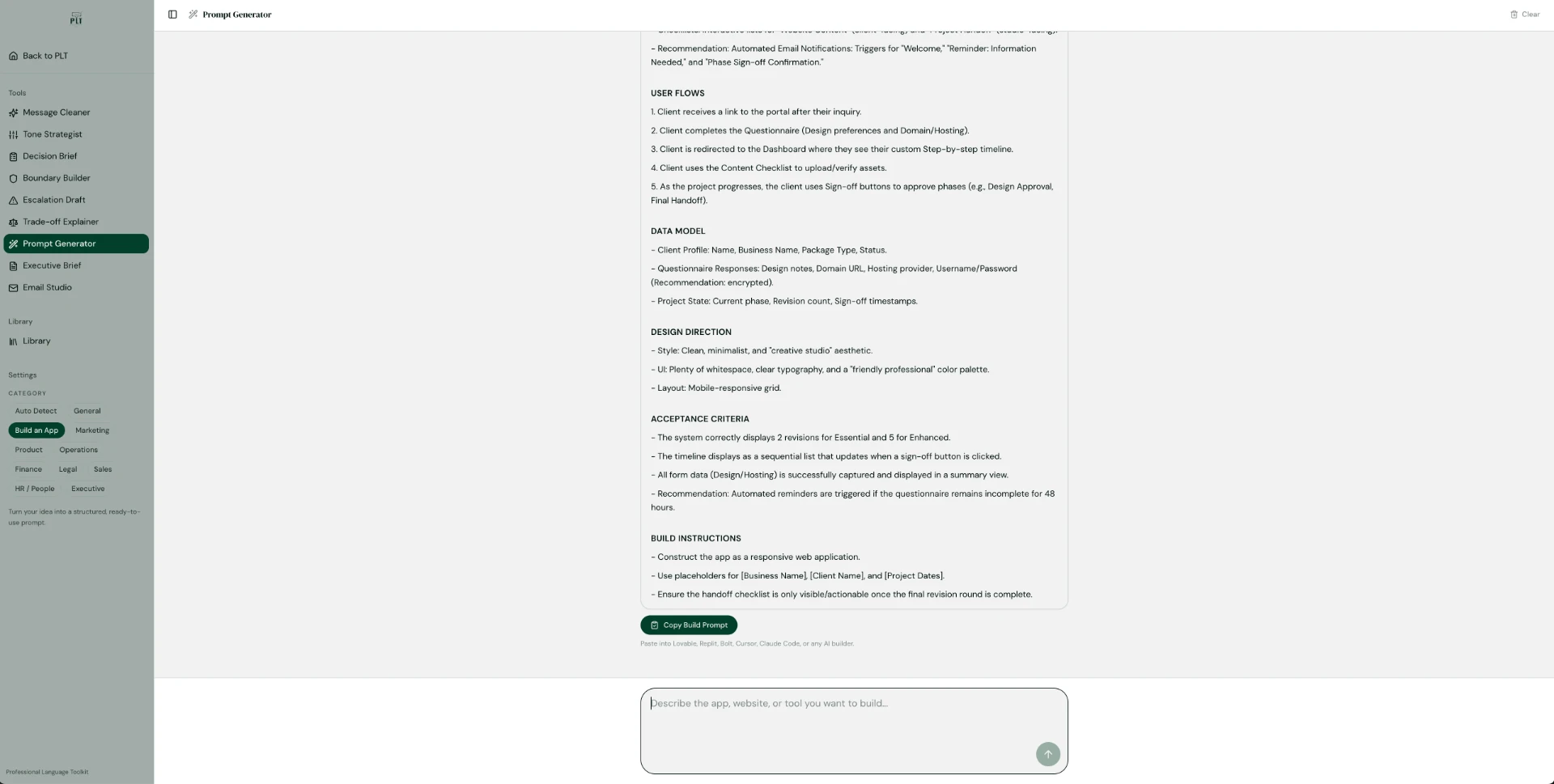
The actual output organizes the request into a build summary and a builder-ready prompt: product overview, requirements from the user, PLT recommendations, pages and screens, user flows, data model, design direction, acceptance criteria and build instructions. Recommendations are labelled as recommendations, separate from what the user asked for.
09 / The application
03 — The application
The studio copies the structured prompt into ChatGPT or Claude to prepare its client onboarding package, then reviews and refines the results.
PLT generates the structured prompt; the external AI tool produces the onboarding documents.
10 / Prompt Generator use cases
Everyday tasks, across industries.
Examples of prompts users can build. PLT prepares the prompt; the work itself happens in the AI tool the user chooses.
- 01Business operations — a small-business owner builds a prompt for a customer onboarding checklist with clear responsibilities and milestones.
- 02Marketing and content — a content creator builds a prompt for campaign ideas that reflect a brand’s audience, tone and goals.
- 03Hospitality and customer experience — a hospitality professional builds a prompt for a thoughtful guest-response framework for complaints or special requests.
- 04Human resources — an HR professional builds a prompt to organize an employee onboarding communication plan or draft a neutral policy explanation.
- 05Project planning — a project manager builds a prompt that turns an unstructured idea into milestones, deliverables, dependencies and risks.
- 06Research and analysis — a professional builds a prompt to compare several options against consistent criteria with a clearly formatted recommendation.
11 / Key features
- 01Task-specific tools with structured inputs
- 02Category settings such as General, Marketing, Product, Operations, Finance, Legal, Sales, HR / People and Executive
- 03Auto Detect category for quick starts
- 04Library for saved and reusable work
- 05Consistent interface across every tool
12 / Practical applications
- 01Writing professional emails and messages
- 02Adjusting tone for different audiences
- 03Communicating boundaries respectfully
- 04Explaining decisions and tradeoffs
- 05Preparing escalation messages
- 06Summarizing complex information
- 07Structuring executive communications
- 08Building more effective prompts for AI tools
13 / What Southern Haze designed
- 01Tool architecture
- 02Prompt systems
- 03Interaction flows
- 04Structured outputs
- 05Library and reuse experience
- 06Product positioning
- 07Public tool experiences
The perspective
Better communication starts with clearer thinking.
PLT demonstrates a Southern Haze principle: useful AI does not have to feel complicated. Sometimes the best AI experience is simply a well-designed tool that knows what question to ask next.
Made at Southern Haze — An original studio product.
Next project →